What an AI backend is
An AI backend is a web service that, somewhere in the request path, calls a language model. Everything around that call is familiar: it accepts HTTP, checks who is asking, reads and writes a database, and returns JSON. What changes is the character of the one dependency in the middle. A model call takes seconds rather than milliseconds, costs money per token, returns text you did not write, and may ask you to run code on its behalf before it will finish. Most of the engineering in this course is about wrapping that call so the rest of the system can rely on it.
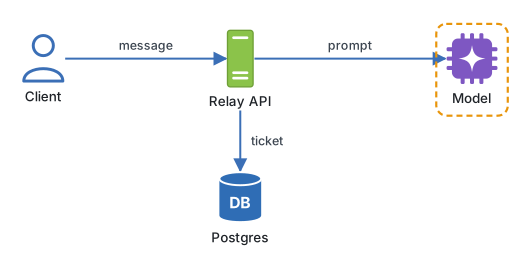
That framing matters because it tells you what to learn. You do not need to train models or understand transformer internals. You need to be good at the things that sit around the model: request handling, validation, storage, streaming, tool execution, and tracing. Those are backend skills, and Python has become the language where the model tooling lives.
The five parts
Every AI backend, whatever framework it uses, has the same five parts. Relay, the support-assistant service you will build across this course, has all of them by the end.
| Part | What it does in Relay | Tools we use |
|---|---|---|
| API layer | Accepts a chat message on a ticket, validates it, streams the answer back | FastAPI, Pydantic |
| Model calls | Sends the prompt, the history, and a tool list to a model; reads the result | OpenAI and Anthropic SDKs |
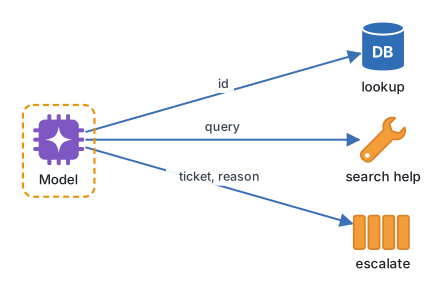
| Tools | Functions the model may request: look up a customer, search help articles, escalate | Plain Python, agent SDKs, MCP |
| State | Tickets and customers in PostgreSQL, cache and queues in Redis, conversation memory | SQLAlchemy, redis-py |
| Observability | A trace for every request showing each model call, its tokens, its cost, and its tools | Langfuse |
The unusual part is the tools row. In a normal service the server decides what to do. In an AI backend the model can say "run lookup_customer with this id and tell me what came back", and your code has to decide whether to obey, run the function, and hand the result back for another round. That loop is the heart of what people call an agent, and you will write it by hand before any framework hides it.
One message through Relay
Follow a single request. A support agent types "Has this customer been charged twice?" on ticket 4821. The request arrives as JSON:
{
  "ticket_id": 4821,
  "message": "Has this customer been charged twice?"
}
The API layer validates the shape, loads the ticket and its customer from PostgreSQL, and checks Redis for a recent answer to a similar question. Finding none, it calls the model with a system prompt, the conversation so far, and a description of the three tools. The model replies not with an answer but with a request to run lookup_customer. The backend runs it, appends the result, and calls the model again. This time the model writes an answer, which the backend streams to the browser token by token. The whole exchange, both model calls and the tool run, lands in Langfuse as one trace.
Written as a loop with the model stubbed out, the shape is short:
def answer(ticket_id: int, message: str) -> str:
    history = load_history(ticket_id)
    history.append({"role": "user", "content": message})
    while True:
        reply = call_model(history, tools=TOOLS)
        if reply.kind == "text":
            return reply.text
        result = TOOLS[reply.tool_name](**reply.arguments)
        history.append({"role": "tool", "content": result})
Everything in this course fills in one of those lines. load_history becomes a database query. call_model becomes a real SDK call with a timeout, retries, and a trace. TOOLS becomes typed functions with schemas the model can read. The while True gains a step limit and a guardrail. The return becomes a stream.
Engineering note. Treat the model like an external payment gateway, not like a library call. Give it a timeout, a budget, a retry policy, and a trace from day one, because the first time it misbehaves in production you will need all four at once.
What is different from a normal backend
Three things change how you design.
Latency is measured in seconds. A model answering a support question takes two to ten seconds. Users will not wait that long staring at a spinner, so streaming partial output is a requirement, not a polish step. That is why Relay's /chat endpoint streams from the first version.
Cost is per request and variable. A database query costs nothing extra. A model call costs a fraction of a cent to several cents depending on how much context you send. Caching, shorter prompts, and choosing a cheaper model for easy questions are real engineering decisions with a line on the bill.
Output is not deterministic. The same input can produce a different answer. That breaks the usual testing habits, and it is why the course spends time on structured outputs, evaluations, and tracing: you cannot assert on the exact text, so you assert on shape, on tool choices, and on scores.
Where it goes wrong
The most common failure is treating the model call like a database call. Default SDK timeouts are generous, retries multiply cost, and one slow call holds a worker for ten seconds. Without a semaphore, twenty concurrent users can exhaust a small service.
The second is letting model text drive control flow without validation. If the model says "escalate this ticket" and your code escalates on a substring match, a customer message containing those words will trigger it. Tools need typed inputs and permission checks.
The third is missing traces. "It said something strange yesterday" cannot be investigated if the prompt, the tools called, and the model's raw output were never recorded. Observability is not a late addition in this course; it appears as soon as there is a model call to observe.
Try it
Before writing any code, sketch Relay's request path on paper. Draw the five parts as boxes, then trace the "charged twice" message through them, numbering each step. Mark where the request waits longest and where it costs money. Keep the sketch; you will compare it against the real trace in Langfuse in module thirteen.
Next: Setting up: Python 3.14, uv, and your editor.
Continue with the complete track
Keep your progress and unlock the surrounding lessons, exercises, and complete learning path.
Unlock the complete track