Values, names, and the REPL
The single idea that explains most of Python's behaviour is this: a variable is a name bound to an object, and assignment binds a name without copying anything. ticket = {"id": 4821} creates one dictionary and sticks the label ticket on it. alias = ticket sticks a second label on the same dictionary. Change it through either label and both see the change, because there is only one object. Coming from a language with value types, or from one where = on a struct copies, this is the adjustment to make first.
The second idea follows from it: types belong to objects, not names. ticket can be bound to a dict now and to a string later, and Python will not complain at the point of assignment. It will complain, loudly, when you try to do something the current object does not support. That is what "dynamically but strongly typed" means in practice: no declarations, no silent coercion.
Names and objects
Open a REPL from inside the Relay project with uv run python. Each line beginning with >>> is something you type; the line after it is what Python prints.
>>> ticket = {"id": 4821, "status": "open"}
>>> alias = ticket
>>> alias["status"] = "escalated"
>>> ticket["status"]
'escalated'
>>> alias is ticket
True
>>> copy = dict(ticket)
>>> copy["status"] = "closed"
>>> ticket["status"]
'escalated'
is asks whether two names point at the same object. == asks whether two objects have equal contents. dict(ticket) builds a new dictionary with the same keys and values, so copy is a different object and changing it leaves ticket alone. The same distinction applies to lists (list(items) or items.copy()) and to any mutable object. These copies are shallow: a list nested inside the dictionary is still shared, and copy.deepcopy is the tool when that matters.
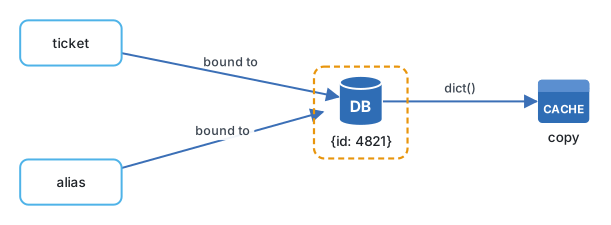
Immutable objects, such as numbers, strings, and tuples, sidestep the whole question. You cannot change them in place, so sharing them is harmless. n = 5; m = n; m += 1 leaves n at five, not because = copied, but because += on an int creates a new int and rebinds m to it. Rebinding a name never affects other names.
There is one more thing the REPL shows you: every object has a type, and you can ask.
>>> type(ticket)
<class 'dict'>
>>> type(4821), type(4821.0), type("4821"), type(None)
(<class 'int'>, <class 'float'>, <class 'str'>, <class 'NoneType'>)
>>> 4821 + "0"
TypeError: unsupported operand type(s) for +: 'int' and 'str'
>>> 10 / 4, 10 // 4, 2 ** 100
(2.5, 2, 1267650600228229401496703205376)
The TypeError is the strong typing at work. Python will not guess whether you wanted 4831 or "48210". Note also that / always returns a float, // is integer division, and ints have no fixed size; two to the hundred is an ordinary value.
The REPL as a workbench
The Python 3.14 REPL is a much better tool than the one people remember. It highlights syntax as you type, lets you edit multi-line blocks with the arrow keys, and has three function keys worth learning: F1 opens help, F2 shows history without the >>> prompts so you can copy it, and F3 enters paste mode so indented code from your editor pastes cleanly. Typing exit leaves, no parentheses needed.
Three built-ins turn it into a reference manual. type(x) says what something is. dir(x) lists what it can do. help(x) prints its documentation, including for your own functions if you wrote a docstring. When you meet an unfamiliar object from a library, dir and help are faster than the docs site.
The name _ holds the last printed result, which is handy for chaining: evaluate a query, then len(_).
Engineering note. Make the REPL the first place you try any unfamiliar library call, before it goes into a file. Ten seconds of
uv run python, an import, and a call tells you the return type and shape; guessing from the documentation and finding out in a test run costs minutes each time.
Use uv run python rather than a bare python so the REPL runs inside the project's environment with its installed packages. Once Relay has dependencies, import fastapi works in that REPL and fails in a system one.
Where it goes wrong
Aliasing surprises are the classic. A function receives a list of tickets, sorts it in place to find the oldest, and the caller's list is now reordered too. The fix is to sort a copy (sorted(tickets) returns a new list) or to be explicit that the function mutates.
Using is for equality bites people who tried x is 5 and saw it work. It works for small integers because Python caches them, and fails for larger ones or for strings built at runtime. Use == for values, and reserve is for None, True, and False, where identity is the right question: if status is None.
Shadowing a built-in is quiet and painful. list = load_tickets() works, and every later list(x) in that module fails with "'list' object is not callable". Editors with a language server underline this; a bare editor does not.
Integer division trips readers from C or Java. 7 / 2 is 3.5. If you wanted three, write 7 // 2.
Try it
In uv run python, build a ticket dictionary with id, customer, status, and messages (a list of strings). Bind a second name to it and append a message through the second name. Confirm through the first name that the message is there. Then make a copy with dict(ticket) and append through the copy's messages; notice that the original changed as well, because dict() copies the outer dictionary and shares the inner list. Repeat with import copy; copy.deepcopy(ticket) and confirm the original is now untouched. Finally, try import json; json.dumps(ticket) and look at the output: that string is what Relay will send over HTTP.
Next: Strings, f-strings, and t-strings.
Continue with the complete track
Keep your progress and unlock the surrounding lessons, exercises, and complete learning path.
Unlock the complete track