The OpenAI Responses API
The Responses API is OpenAI's single endpoint for talking to a model. You give it a model name, instructions, and input; it returns a list of output items, of which the common one is text. The Python SDK wraps that in one method, client.responses.create, and the rest of this lesson is learning what to pass in and what to read out, then putting it behind a FastAPI route in Relay.

The first call
Install the SDK and set the key in the environment. The client reads OPENAI_API_KEY on construction.
uv add openai
export OPENAI_API_KEY=sk-...
from openai import OpenAI

client = OpenAI()

SYSTEM = (
    "You are Relay, the support assistant for Acme Notes. "
    "Answer briefly and only about the product."
)

response = client.responses.create(
    model="gpt-6-astra",
    instructions=SYSTEM,
    input="My invoice for August was charged twice.",
    max_output_tokens=400,
)
print(response.output_text)
print(response.usage.input_tokens, response.usage.output_tokens)
Four things to notice. instructions is the system prompt: what the model is, how it should behave, what it must not do. input is the user's content, either a string or a list of messages with roles. max_output_tokens caps the answer and, with it, your cost. And response.output_text is a convenience that joins every text item in the output into one string.
That last point deserves care. The real result is response.output, a list of items. Today it holds one message item with text; once you add tools it can hold function calls, and a refused request produces a refusal item. output_text is fine for a first script and misleading once the output can be something other than an answer. Relay's route below reads it, but logs the item types alongside.
Turns and history
The API is stateless. To continue a conversation, you send the previous turns again as a list of messages.
history = [
    {"role": "user", "content": "My invoice for August was charged twice."},
    {"role": "assistant", "content": "I see two charges. Is your card ending 4471?"},
    {"role": "user", "content": "Yes, that one."},
]
response = client.responses.create(
    model="gpt-6-astra", instructions=SYSTEM, input=history
)
The SDK also offers previous_response_id, which lets the server chain a new call onto an earlier response so you do not resend the history yourself. It is convenient for prototypes. Relay keeps its own history in Postgres instead, because that history has to survive a provider switch, feed the tracing in module thirteen, and be trimmed under the token budget from the previous lesson.
| Parameter | What it does | Relay's default |
|---|---|---|
model |
Which model answers | gpt-6-astra |
instructions |
System prompt | Loaded from a versioned file |
input |
String or list of role messages | The trimmed history |
max_output_tokens |
Hard cap on the answer | 400 for chat, 120 for triage |
temperature |
Randomness, 0 to 2 | Default for chat, 0 for triage |
stream |
Yield events instead of a final object | On, from lesson 08.04 |
Inside FastAPI
The client holds an HTTP connection pool, so create it once, at startup, and share it. The async client is AsyncOpenAI; awaiting its calls is what keeps the event loop free while the model thinks.
from contextlib import asynccontextmanager
from fastapi import FastAPI, Request
from openai import AsyncOpenAI
from pydantic import BaseModel

@asynccontextmanager
async def lifespan(app: FastAPI):
    app.state.openai = AsyncOpenAI()
    yield
    await app.state.openai.close()

app = FastAPI(lifespan=lifespan)

class ChatIn(BaseModel):
    question: str

@app.post("/chat")
async def chat(body: ChatIn, request: Request):
    client: AsyncOpenAI = request.app.state.openai
    r = await client.responses.create(
        model="gpt-6-astra", instructions=SYSTEM,
        input=body.question, max_output_tokens=400,
    )
    return {
        "answer": r.output_text,
        "items": [item.type for item in r.output],
        "usage": r.usage.model_dump(),
    }
Run it with uv run fastapi dev main.py and post a question. The response carries the answer, the item types, and usage. That usage field is not decoration: it is the raw material for the cost logging the previous lesson asked for.
Engineering note. Set
timeoutandmax_retrieson the client at construction, not per call, so every route inherits the same policy. The defaults are generous, and a route that waits ten minutes on a stuck request is a worse failure than one that gives up in thirty seconds and tells the user.
Where it goes wrong
- A client per request. Constructing
AsyncOpenAI()inside the route builds a new connection pool every time. Under load it shows up as slow TLS handshakes and file-descriptor exhaustion. Build it inlifespan. - The sync client in an async route.
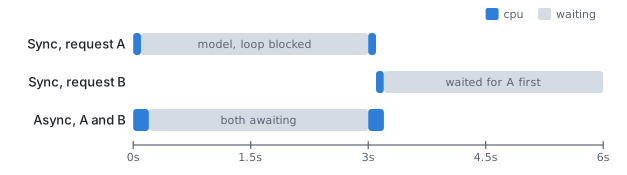
OpenAI()blocks the thread it runs on. Insideasync defthat thread is the event loop, so every other request waits for the model too. UseAsyncOpenAIin async code, or run the sync call in a worker thread. - Trusting
output_textblindly. When the model returns a refusal or a function call,output_textcan be empty. The route returns an empty answer with status 200 and nobody notices for a week. Check the item types. - No output cap. Without
max_output_tokens, one prompt that makes the model list every feature of the product costs thirty times the usual call.
Try it
Add /chat to your Relay project as above, then extend the response with a cost_usd field computed from usage with the helper from the previous lesson. Post three questions of different lengths and confirm the cost moves with input size more than output size. Finally, drop max_output_tokens to 50 and observe how the answer ends.
The Anthropic Messages API covers the same ground with a different shape, and seeing both side by side is what makes the provider switch a settings change instead of a rewrite.
Continue with the complete track
Keep your progress and unlock the surrounding lessons, exercises, and complete learning path.
Unlock the complete track