Setting up: Python 3.14, uv, and your editor
Python's reputation for painful setup is earned, and it is also out of date. The pain came from five separate tools: one to install interpreters, one to make virtual environments, one to install packages, one to pin them, and one to run command-line tools in isolation. uv, from Astral, replaces all five with a single fast binary. In this course you install uv once, and after that every Python task starts with uv.
The result is a workflow that feels like modern tooling in other languages. A project is a directory with a pyproject.toml. Dependencies are declared there and locked in uv.lock. Running a script means uv run, and uv makes sure the right interpreter and the right packages exist before it runs anything. You will not activate an environment in this course, and you will not type pip.
Install uv and Python 3.14
uv installs with one command. On macOS and Linux:
curl -LsSf https://astral.sh/uv/install.sh | sh
On Windows, in PowerShell: powershell -ExecutionPolicy ByPass -c "irm https://astral.sh/uv/install.ps1 | iex". Open a new terminal afterwards so the binary is on your path, then confirm with uv --version.
uv can install Python interpreters itself, so you do not need a system Python or a separate version manager:
uv python install 3.14
uv python list
The second command shows every interpreter uv knows about, with the ones it installed marked by path. Python 3.14 is the version this course targets. It brings template strings, deferred annotations, a supported free-threaded build, and a friendlier REPL. If your production servers run 3.12 or 3.13, everything here still works; the few 3.14-only features are pointed out when they appear.
Create the Relay project
Relay is the project you will grow across the course, so create it now:
uv init relay
cd relay
uv python pin 3.14
uv run main.py
uv init creates a small, complete project: a pyproject.toml describing it, a main.py with a main() function, a README.md, a .gitignore, and a .python-version file. uv python pin 3.14 writes that version file so everyone who clones the repository gets the same interpreter. The first uv run does the rest: it creates a .venv directory, resolves the (currently empty) dependency list, writes uv.lock, and runs the file. You should see the one-line greeting that uv init wrote into main.py.
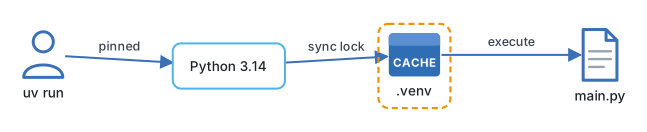
The generated pyproject.toml is the single source of truth for the project:
[project]
name = "relay"
version = "0.1.0"
description = "Support-assistant backend"
readme = "README.md"
requires-python = ">=3.14"
dependencies = []
When a later lesson says uv add fastapi, uv adds the package to dependencies, updates the lock file, and installs it into .venv, in one step. uv sync recreates that environment from the lock file on another machine. uv lock refreshes the lock without installing. Commit pyproject.toml and uv.lock; never commit .venv.
There is one more command worth knowing. uvx ruff check . runs the ruff linter without adding it to the project, downloading it into a cache the first time. Use uvx for tools you run, and uv add for libraries your code imports.
Engineering note. Decide today that
uv runis the only way code gets executed in this project, including in CI and Docker. The moment someone runspython main.pywith a system interpreter, you have two environments, and the bug reports that follow will not mention which one they used.
An editor that understands Python
Any editor works, but the difference between a plain text editor and one with a Python language server is large. You want three things: completions that know your dependencies, inline type errors, and a formatter that runs on save.
| Editor | Setup | Notes |
|---|---|---|
| VS Code | Install the Python and Ruff extensions | Select .venv as the interpreter when prompted; Pylance gives type checking |
| PyCharm | Open the relay folder |
Detects .venv automatically; strong refactoring and debugger |
| Zed or Neovim | Enable pyright or basedpyright and ruff language servers |
Lightest option; configure the interpreter path to .venv |
Whichever you choose, point it at the .venv that uv created. That is what makes completions match the packages you actually installed. In VS Code, the interpreter picker is in the bottom status bar; choose the entry ending in relay/.venv/bin/python (or Scripts\python.exe on Windows).
Turn on format-on-save with Ruff. Formatting arguments end when nobody formats by hand, and the course code is written to Ruff's defaults.
Where it goes wrong
The first failure is a stale shell. After installing uv, the current terminal does not know about it. Open a new one.
The second is a mismatched interpreter. If the editor is using a system Python rather than .venv, every import will be underlined in red even though uv run works. Fix the interpreter selection, not the imports.
The third is running the file with python instead of uv run. On a machine with several Pythons, python may be 3.9 from an old install, and 3.14 syntax will fail with a confusing error. uv run always uses the pinned version.
The fourth is committing .venv. It is hundreds of megabytes of platform-specific files. The generated .gitignore excludes it; leave that line alone.
Try it
Create the Relay project as shown, then edit main.py so main() prints a ticket summary: a ticket id, a customer name, and a one-line subject, as three formatted lines. Run it with uv run main.py. Then run uvx ruff format main.py and uvx ruff check main.py and confirm both pass. If your editor shows a red underline anywhere, fix the interpreter selection before moving on.
Next: How to use this course.
Continue with the complete track
Keep your progress and unlock the surrounding lessons, exercises, and complete learning path.
Unlock the complete track