How to use this course
This course has one thread running through it: Relay, a support-assistant backend, grows from an empty uv init directory into a traced, containerised service with a streaming chat endpoint and an agent that can look up customers, search help articles, and escalate tickets. Each lesson adds one idea and, usually, one piece of Relay. The lessons are short on purpose. Reading one and doing its exercise takes thirty to forty-five minutes, and the exercise is where the learning happens.
The reader we have in mind already programs in some language. You may have written Python before without ever feeling fluent, or you may be arriving from TypeScript, Go, or Java. Either way, the early modules move fast through the language and slow down where Python differs from what you expect.
The roadmap
Fifteen modules, arranged in five parts after this orientation.
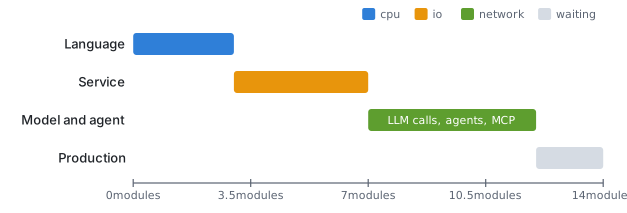
| Part | Modules | What Relay gains |
|---|---|---|
| Python foundations | 01 Python that reads well · 02 Python for real programs · 03 Async Python | Ticket data structures, tests, an async HTTP client |
| Data and APIs | 04 Pydantic · 05 FastAPI fundamentals · 06 Databases · 07 Real-time | Validated models, routes, PostgreSQL and Redis, a streaming endpoint |
| Calling models | 08 LLM APIs from Python | Real model calls, structured outputs, a hand-written tool loop, a small RAG endpoint |
| Agents | 09 Agent fundamentals · 10 OpenAI Agents SDK · 11 LangChain and LangGraph · 12 MCP | The Relay agent with its three tools, memory, and guardrails, exposed over MCP |
| Production | 13 Observability with Langfuse · 14 Shipping | Traces, evals, configuration, Docker, cost control, and the capstone |
Modules one through three are the language. If you are already comfortable with Python, including async, skim them and do the exercises anyway; they set up files the later modules assume exist. Modules four through seven are the web service without any model in it. That order is deliberate: a /chat endpoint that streams tokens is easier to understand when you have already streamed plain text from FastAPI. Module eight is where the model arrives. Modules nine through twelve build the agent three ways, so you can choose a framework with evidence rather than habit. The last two modules make it something you could run for real people.
How to study a lesson
Every lesson has the same shape: a written page and a narrated video covering the same idea from different angles. Watch or read first, whichever suits you, then do the "Try it" exercise before moving on. The exercises are the only place the course checks whether the idea stuck.
Type the code. Copying and pasting produces a working file and no memory of how it works. When you type it, you notice the async you forgot, the trailing comma Python allows, the Annotated that looked like noise until you needed it.
Keep Relay runnable. Before you start a lesson, uv run should succeed. After the exercise, it should still succeed. A convenient habit is one branch per module:
git checkout -b module-05
uv run fastapi dev main.py     # or whatever the lesson runs
uv run pytest
git commit -am "05.03 response models"
If something breaks and you cannot see why, the "Where it goes wrong" section of each lesson lists the failures we have seen most often. Check it before searching elsewhere.
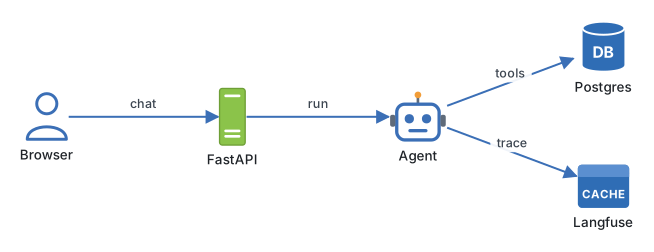
By the end of the course, the project looks roughly like this:
relay/
├── pyproject.toml
├── uv.lock
├── Dockerfile
├── alembic/
├── relay/
│   ├── api/          # FastAPI routers
│   ├── models/       # SQLAlchemy tables
│   ├── schemas/      # Pydantic models
│   ├── agent/        # tools, prompts, the loop
│   └── tracing.py    # Langfuse setup
└── tests/
You do not need to create that structure now. It grows one directory at a time, and module two explains the layout when there is enough code to justify it.
Engineering note. When a lesson's code does not match what you see in a library's current documentation, trust the documentation and note the difference. This course is dated September 2026 and pins the versions it uses; the ideas last longer than the exact method names.
What you need
A machine with uv and Python 3.14 from the previous lesson. Docker Desktop or an equivalent from module six onwards, for PostgreSQL and Redis. An API key from OpenAI or Anthropic from module eight; the lessons show both providers, and the examples cost cents, not dollars, if you use the cheaper models they name. A free Langfuse cloud account, or a self-hosted instance, from module thirteen.
Free lessons are marked in the curriculum. The first lesson of most modules is free, so you can sample each part before deciding whether the rest is for you.
Where it goes wrong
Skipping the exercises is the main way this course fails. The written pages are readable in an evening; understanding is not. If you are short on time, watch the video, do the exercise, and skip the reading, rather than the other way around.
The second failure is jumping to module ten because agents are the interesting part. The Agents SDK lessons assume you can write an async FastAPI route, a Pydantic model, and a hand-rolled tool loop. Without those, the framework is magic, and magic is impossible to debug.
The third is letting Relay rot. If a lesson's exercise is left half done, the next lesson's code will not fit, and the gap widens. Finish or revert; do not leave a broken tree.
Try it
Open the curriculum and write down, for each of the five parts, one thing you can already do and one thing you cannot. Then set a schedule: there are eighty-six lessons, so two a week takes about ten months, and one module a week finishes in under four. Put the first three sessions in your calendar before you start module one.
Next: Values, names, and the REPL.
Continue with the complete track
Keep your progress and unlock the surrounding lessons, exercises, and complete learning path.
Unlock the complete track