LangChain 1.0: models, tools, and create_agent
In lesson 08.06 you wrote the tool-calling loop yourself: send the messages, look for a tool call in the reply, run the function, append the result, send again, stop when the model stops asking. LangChain 1.0 packages that loop as a single function, create_agent. You hand it a model, a list of tools and a few options, and it returns something you can invoke with messages. Nothing you learned about the loop stops being true; it is now somebody else's tested code.
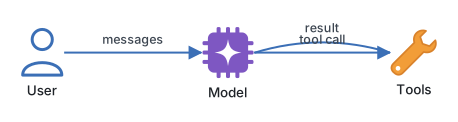
The 1.0 release is worth knowing about because it is a much smaller library than the LangChain of a few years ago. The old chains and legacy agent classes have moved out of the main package. What is left is a model interface that works across providers, a @tool decorator, create_agent, and a middleware system for hooking into the loop. Under the surface the agent is a LangGraph graph, which is why the next three lessons move to LangGraph without changing a single tool.
Tools first, then the agent
Install the core package and one provider integration. The model is named as a string with a provider prefix, and the prefix decides which integration package is loaded.
uv add langchain langchain-anthropic
export ANTHROPIC_API_KEY=sk-ant-...
Relay's three tools are plain typed functions. The decorator reads the signature and the docstring and builds the JSON Schema the model sees, so the docstring is not a comment: it is the text the model uses to decide when to call the function.
from langchain.tools import tool
from relay.services import articles, customers, tickets


@tool
def lookup_customer(email: str) -> dict:
    """Fetch a customer's plan, region and open tickets by email."""
    return customers.get_by_email(email)


@tool
def search_help_articles(query: str, limit: int = 3) -> list[dict]:
    """Search Relay's help articles. Returns title, url and a snippet."""
    return articles.search(query, limit=limit)


@tool
def escalate_ticket(ticket_id: int, reason: str) -> str:
    """Escalate a ticket to a human. Use only when the articles cannot answer."""
    tickets.escalate(ticket_id, reason)
    return f"ticket {ticket_id} escalated"
Now the agent. The checkpointer is what gives it memory: every run is filed under a thread_id, and a second call with the same thread continues the conversation instead of starting one.
from langchain.agents import create_agent
from langgraph.checkpoint.memory import InMemorySaver

agent = create_agent(
    model="anthropic:claude-sonnet-5",
    tools=[lookup_customer, search_help_articles, escalate_ticket],
    system_prompt="You are Relay, the support assistant for Northwind Cloud.",
    checkpointer=InMemorySaver(),
)

config = {"configurable": {"thread_id": "ticket-4812"}}
result = agent.invoke(
    {"messages": [{"role": "user", "content": "I'm ana@example.com and my export is stuck."}]},
    config=config,
)
print(result["messages"][-1].content)
result["messages"] is the whole transcript: the user message, the assistant's tool call, the tool result, and the final answer. Printing it once is the fastest way to see what the loop did on your behalf.
What the function is doing
The loop inside create_agent is the one from module eight, with each step made into a named part you can reach.
| Step in the loop | What you wrote in 08.06 | What create_agent does |
|---|---|---|
| Build the tool schemas | JSON Schema by hand | Derived from signatures and docstrings |
| Call the model | Provider SDK call | Provider-neutral model interface |
| Detect a tool call | Inspect the response blocks | Standard tool_calls on the message |
| Run the tool | Your if name == ... dispatch |
A tools node that runs them, in parallel when the model asks for several |
| Keep the transcript | A list you appended to | State saved by the checkpointer per thread |
| Stop | while True with a break |
Ends when the model replies without a tool call |
Two options change what comes back. response_format=SomePydanticModel makes the agent finish with a validated object in result["structured_response"], which lesson 11.04 covers. Middleware lets you run code before the model call, after it, or around each tool call, which is where request logging, budget checks and prompt trimming live without touching the loop itself.
Engineering note. Treat the tool docstring and parameter names as part of the prompt and review them like one. Most "the agent picked the wrong tool" bugs are fixed by rewriting one sentence in a docstring, not by changing the model. Keep tool return values small and textual; a tool that returns a whole customer record with forty fields is paying tokens for data the model will not use.
Where it goes wrong
- A checkpointer with no thread_id. Once
checkpointer=is set, every invoke needsconfig={"configurable": {"thread_id": ...}}. Forgetting it raises immediately, which is the good outcome; the bad one is reusing a constant thread id across customers so their conversations merge. - Calling
invokeinside an async FastAPI route. The sync call blocks the event loop for the whole agent run, which can be seconds. Useawait agent.ainvoke(...)in async code. - Trusting the last message. If the loop hits the recursion limit, the final message may be a tool call that never ran. Check for
tool_callson it before you send it to a user. - Tools that raise. By default an exception in a tool becomes an error message the model sees and can retry around. That is usually right, but an exception from a bug looks the same as one from bad input, so log both.
- Vague docstrings. "Search articles" with no mention of what comes back gives the model no reason to prefer it over escalating.
Try it
Wire the three tools to your Relay service functions from module six and run two invocations on the same thread: first the customer's email and problem, then "did that article help, or should we escalate?". Print result["messages"] after each run and read the transcript. Then change the model string to "openai:gpt-6-astra", add langchain-openai, and confirm nothing else in the file needs to change.
Next, the graph that create_agent builds for you gets opened up in LangGraph: state, nodes, and edges.
Continue with the complete track
Keep your progress and unlock the surrounding lessons, exercises, and complete learning path.
Unlock the complete track