Streaming responses and JSON lines
A model answer takes a few seconds to generate and arrives one token at a time. If the /chat endpoint waits for the last token before responding, the user stares at nothing for the whole wait and then gets a wall of text. If it sends each token as it is produced, the first word appears in under half a second and the rest flows in. Same total time, completely different experience, and the total time is not even the point: a user who sees the answer starting reads along and stops waiting.
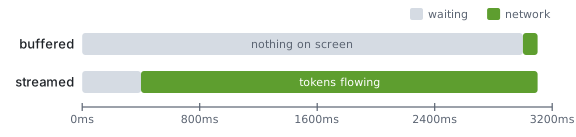
FastAPI streams with StreamingResponse wrapped around an async def generator. Each yield becomes a chunk on the wire. Everything else in this module, server-sent events and WebSockets included, is a wire format layered over this same idea, so it is worth getting the plain version exact first.
The generator and the response
# relay/routes/chat.py
import asyncio
from fastapi import APIRouter
from fastapi.responses import StreamingResponse

router = APIRouter()


async def fake_tokens(prompt: str):
    for word in "Your invoice is due on the fourth of next month.".split():
        await asyncio.sleep(0.15)
        yield word + " "


@router.post("/chat", response_class=StreamingResponse)
async def chat(prompt: str):
    return StreamingResponse(fake_tokens(prompt), media_type="text/plain")
The route returns immediately with headers and Transfer-Encoding: chunked, then the body is written chunk by chunk as the generator yields. Nothing is buffered in the app. The await asyncio.sleep stands in for waiting on a model; the real version in module eight replaces it with async for event in stream.

response_class=StreamingResponse on the decorator is documentation for OpenAPI and for readers; the actual behaviour comes from returning the response object.
Test it from a terminal with curl -N, which turns off curl's own buffering so you see the words arrive:
curl -N -X POST "http://localhost:8000/chat?prompt=when+is+my+invoice+due"
JSON lines
Plain text works when the stream is only text. A chat stream carries more than that: tokens, but also a citation to a help article, a tool call, a final message with token counts. Each of those is a small object, and the client needs to know where one ends and the next begins. JSON lines is the format for that: one JSON object per line, newline-terminated, no surrounding array. The client reads a line, parses it, acts, and reads the next.
# relay/routes/chat.py
import json
from typing import Literal
from pydantic import BaseModel


class Token(BaseModel):
    type: Literal["token"] = "token"
    text: str


class Citation(BaseModel):
    type: Literal["citation"] = "citation"
    article_id: int
    title: str


class Done(BaseModel):
    type: Literal["done"] = "done"
    input_tokens: int
    output_tokens: int


async def chat_events(prompt: str):
    yield Citation(article_id=42, title="Billing dates").model_dump_json() + "\n"
    async for word in fake_tokens(prompt):
        yield Token(text=word).model_dump_json() + "\n"
    yield Done(input_tokens=18, output_tokens=11).model_dump_json() + "\n"


@router.post("/chat", response_class=StreamingResponse)
async def chat(prompt: str):
    return StreamingResponse(chat_events(prompt), media_type="application/x-ndjson")
The Pydantic models with a type discriminator are the contract. The client side of that contract is a TypeAdapter over the union, which the Pydantic lesson on discriminated unions already covered, so a Python client parses every line with one call.
import httpx
from pydantic import TypeAdapter

Event = TypeAdapter(Token | Citation | Done)

async with httpx.AsyncClient(timeout=httpx.Timeout(30.0)) as client:
    async with client.stream("POST", "http://localhost:8000/chat", params={"prompt": "hi"}) as r:
        async for line in r.aiter_lines():
            if line:
                event = Event.validate_json(line)
                print(event)
The newline is what makes this parseable incrementally. A single JSON array of events would be valid JSON only once the closing bracket arrived, which is after the last token.
| Format | Framing | Parse as it arrives | Carries structure | Browser support |
|---|---|---|---|---|
| Plain text | None | Yes | No | fetch + reader |
| JSON lines | Newline | Yes | Yes | fetch + reader, split on \n |
| One JSON array | Brackets | No | Yes | After completion only |
| Server-sent events | data: lines, blank line |
Yes | Yes | EventSource built in |
Engineering note. Put the error in the stream. Once the headers have gone out with a 200, an exception in the generator cannot become a 500; the connection just closes. Yield a
{"type": "error", "message": ...}line inside atry/exceptin the generator so the client learns what happened instead of guessing from a truncated body.
Where it goes wrong
A proxy or load balancer that buffers responses turns your stream back into a single delayed blob. Nginx needs proxy_buffering off for the route, and some CDNs need a header such as X-Accel-Buffering: no. Test through the real path, not only against localhost:8000.
Compression middleware buffers too. GZipMiddleware collects the body to compress it, which defeats streaming; exclude the chat route or skip compression for application/x-ndjson.
A client that disconnects does not stop the generator by itself. The next yield after the disconnect raises inside Starlette and the generator is closed, but any work between yields, such as an in-flight model call, keeps going until then. Check await request.is_disconnected() in long loops if the work is expensive.
Blocking calls inside the generator stall every other request. time.sleep or a synchronous HTTP client inside an async def generator blocks the event loop for the whole stream.
Try it
Replace fake_tokens with a generator that reads Relay's help article for "Billing dates" from a file and yields it word by word with a fifty-millisecond pause. Add a Citation event first and a Done event last with real word counts. Consume it with the httpx client above and print each event's type as it arrives, then time how long until the first token versus the last.
Next, server-sent events for token streams gives the browser a built-in client for exactly this shape of stream.
Continue with the complete track
Keep your progress and unlock the surrounding lessons, exercises, and complete learning path.
Unlock the complete track