SQLAlchemy 2.0 async basics
A database call is the slowest thing most request handlers do, and in an async FastAPI app it must not block the event loop. SQLAlchemy 2.0 gives you an async engine that speaks to PostgreSQL through the asyncpg driver, so every query is an await that lets other requests run while the rows are in flight.
The 2.0 style is small and consistent: you build a statement with select(), hand it to a session with await session.execute(), and read the result. Once you know those three moves, the rest of the library is variations on them.
Engine, session, statement
The engine is the connection pool. You make one per process, at startup, and keep it for the life of the app. The session is a short-lived workspace: it borrows a connection, tracks the objects you load, and turns your changes into SQL when you commit. One session per request is the rule, and async_sessionmaker is the factory that hands them out.

uv add sqlalchemy asyncpg
# relay/db.py
from sqlalchemy.ext.asyncio import (
    AsyncSession, async_sessionmaker, create_async_engine,
)

DATABASE_URL = "postgresql+asyncpg://relay:relay@localhost:5432/relay"

engine = create_async_engine(DATABASE_URL, echo=False, pool_size=10)
SessionLocal = async_sessionmaker(engine, expire_on_commit=False)


async def get_session() -> AsyncSession:
    async with SessionLocal() as session:
        yield session
The URL names the dialect and driver together: postgresql+asyncpg. If you leave out +asyncpg, SQLAlchemy picks the synchronous psycopg2 driver and create_async_engine refuses to start, which is the correct behaviour.
expire_on_commit=False matters more in async code than it did in the old sync world. By default SQLAlchemy marks every loaded object as stale after a commit, and the next attribute access triggers a fresh query. In async code that lazy query happens outside an await, and it fails with a MissingGreenlet error. Turning expiry off means the objects you loaded keep their values after commit, which is almost always what a request handler wants.
A table and a query
Declare tables as classes. The Mapped[...] annotation is the column type and mapped_column() holds the database details.
# relay/models.py
from datetime import datetime
from sqlalchemy import String, func
from sqlalchemy.orm import DeclarativeBase, Mapped, mapped_column


class Base(DeclarativeBase):
    pass


class Ticket(Base):
    __tablename__ = "tickets"

    id: Mapped[int] = mapped_column(primary_key=True)
    customer_id: Mapped[int]
    subject: Mapped[str] = mapped_column(String(200))
    status: Mapped[str] = mapped_column(String(20), default="open")
    created_at: Mapped[datetime] = mapped_column(
        server_default=func.now()
    )
With the model in place, reading and writing look like this.
from sqlalchemy import select
from relay.db import SessionLocal
from relay.models import Ticket


async def open_tickets_for(customer_id: int) -> list[Ticket]:
    async with SessionLocal() as session:
        stmt = (
            select(Ticket)
            .where(Ticket.customer_id == customer_id)
            .where(Ticket.status == "open")
            .order_by(Ticket.created_at.desc())
        )
        result = await session.execute(stmt)
        return list(result.scalars().all())


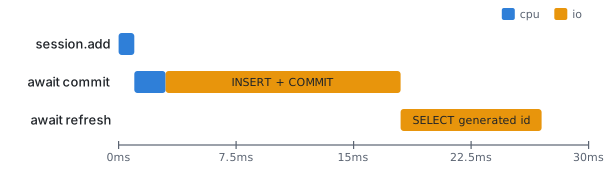
async def create_ticket(customer_id: int, subject: str) -> Ticket:
    async with SessionLocal() as session:
        ticket = Ticket(customer_id=customer_id, subject=subject)
        session.add(ticket)
        await session.commit()
        await session.refresh(ticket)
        return ticket
execute() returns rows, and each row is a tuple of the things you selected. When you selected a single model, scalars() unwraps that one-element tuple so you get Ticket objects. scalar_one() is the strict version for a query that must return exactly one row, and scalar_one_or_none() is the lookup-by-id version.
refresh() after the commit pulls back the values the database generated, in this case id and created_at. It is an explicit await, so it is safe in async code.
| You want | Call | Returns |
|---|---|---|
| All matching models | result.scalars().all() |
list[Ticket] |
| Exactly one, else error | result.scalar_one() |
Ticket |
| One or nothing | result.scalar_one_or_none() |
Ticket | None |
| Selected columns | result.all() |
list of row tuples |
Engineering note. Keep the engine in one module and import it, never create engines inside functions. Each engine owns a pool, and an engine per call means a fresh pool per call, which is a slow way to run out of PostgreSQL connections in production.
Where it goes wrong
The MissingGreenlet error is the one everybody hits first. It means something triggered a query without an await: accessing a relationship that was never loaded, reading an expired attribute after commit, or calling a sync-only method. The fix is always to make the load explicit, with expire_on_commit=False, await session.refresh(), or an eager-load option on the statement.
Sharing one session across concurrent tasks is the second trap. A session is not safe to use from two coroutines at once, so asyncio.gather() over functions that share a session will corrupt its state. Give each task its own session from the factory.
Forgetting await engine.dispose() at shutdown leaves connections open until PostgreSQL times them out. Put the dispose call in the lifespan teardown; the next lesson wires that in.
Finally, echo=True is wonderful for learning and terrible in production. It logs every statement at INFO level and will fill a disk under load.
Try it
Start PostgreSQL locally (docker run -e POSTGRES_PASSWORD=relay -e POSTGRES_USER=relay -e POSTGRES_DB=relay -p 5432:5432 postgres:17), create the table with Base.metadata.create_all through engine.begin(), and write a script that inserts three Relay tickets for one customer, closes one, and prints the open ones ordered newest first. Then remove expire_on_commit=False, read ticket.subject after the commit, and watch the error appear, so you recognise it later.
Next, models, sessions, and Alembic migrations puts the customers table alongside tickets and stops you calling create_all by hand.
Continue with the complete track
Keep your progress and unlock the surrounding lessons, exercises, and complete learning path.
Unlock the complete track