MCP: servers, clients, and tools
Relay's three tools exist so that a model can look up a customer, search the help articles and escalate a ticket. Until now they have lived inside whichever agent you were building. The moment a second host wants them, a desktop assistant for the support team or an IDE plugin for the on-call engineer, you face a choice between copying the functions and inventing an API for them. Every team invents that API slightly differently, and every host has to be taught each one.
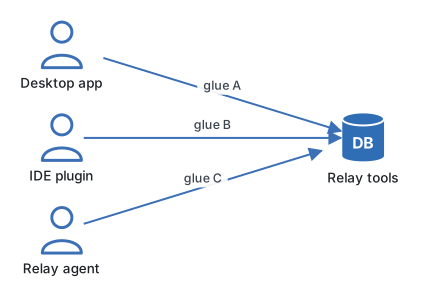
The Model Context Protocol is the agreed API. A server offers capabilities; a client, embedded in the host application, discovers and calls them; the messages between them are JSON-RPC over a transport. Relay's tools become a Relay MCP server, and any host that speaks the protocol can use them without a line of Relay-specific glue.
The three roles and the three primitives
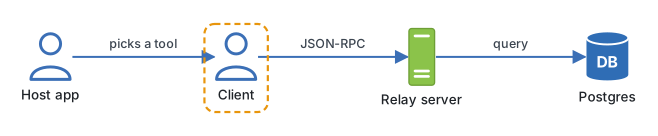
A host is the application with the model in it: a chat desktop app, an editor, or your own agent process. Inside the host, a client holds one connection to one server. A host with four servers has four clients. The server is a small program that knows how to do things and describes them in a way a model can read.
A server exposes three kinds of thing, and the difference is who decides to use them.
| Primitive | Controlled by | Shape | Relay example |
|---|---|---|---|
| Tool | The model, during a run | Named function with a JSON Schema for its arguments | escalate_ticket(ticket_id, reason) |
| Resource | The host application | Read-only data at a URI | ticket://4812, the full ticket text |
| Prompt | The user, on request | A named template with arguments | "Draft a refund reply for ticket N" |
Tools are what agents call. Resources are context the host can attach before the model even sees the question, which is why they are addressed by URI and never have side effects. Prompts are canned starting points a person picks from a menu. Most servers you write will be mostly tools, with a resource or two for the data a host would otherwise have to paste in.
What goes over the wire
Every exchange is a JSON-RPC 2.0 message. A session starts with an initialize handshake where both sides say which protocol version and which primitives they support. The client then asks tools/list, receives names, descriptions and schemas, and offers them to the model. When the model picks one, the client sends tools/call.
{
  "jsonrpc": "2.0",
  "id": 7,
  "method": "tools/call",
  "params": {
    "name": "lookup_customer",
    "arguments": {"email": "ana@example.com"}
  }
}
The reply carries content blocks the model can read, and, when the server declares an output schema, a structuredContent object the calling code can use directly. Errors are reported the same way, so a failed lookup arrives as data the model can reason about rather than as a dropped connection.
Two transports carry those messages. stdio runs the server as a child process of the host and talks over its standard input and output; it is the local, zero-network choice and the one desktop hosts use most. Streamable HTTP exposes a single endpoint, conventionally /mcp, that accepts POSTed messages and may answer with a stream of events; it is the choice for a server that runs somewhere else, serves several hosts, or sits behind your usual auth.
| Transport | Where the server runs | Auth | Use it when |
|---|---|---|---|
| stdio | A child process on the same machine | Inherited from the user | Local tools, desktop hosts, development |
| Streamable HTTP | Any reachable host, one /mcp URL |
Headers, same as any API | Shared servers, production, several clients |
From Python the client side is short. The SDK's Client takes a URL and gives you the primitives as methods.
import asyncio
from mcp import Client


async def main():
    async with Client("http://localhost:8000/mcp") as client:
        tools = await client.list_tools()
        print([t.name for t in tools])

        result = await client.call_tool(
            "lookup_customer", {"email": "ana@example.com"}
        )
        print(result.structured_content)


asyncio.run(main())
Engineering note. Think of an MCP server as a public API with a model as its main consumer. Every tool description will be read by a model thousands of times, and every tool can be called by any host you have granted access to. Write descriptions the way you would write documentation for a careful but literal colleague, and put authorisation in the server, because you will not control the hosts.
Where it goes wrong
- Tools that do what resources should. A
get_ticket_texttool works, but the host cannot attach it as context up front, and the model spends a turn asking for it. If it is read-only data with an address, make it a resource. - One server for everything. A server with sixty tools gives the model sixty descriptions to read on every turn. Group by purpose; Relay's support tools and its billing tools are two servers.
- Trusting the client for identity. On the HTTP transport the server sees a request, not a user. Authenticate it as you would any API, and decide per tool what that caller may do.
- Descriptions that describe the code. "Calls the customers service" tells the model nothing about when to use it. Say what the tool answers and when it is the wrong choice.
- Assuming stdio is private. A stdio server inherits the environment of the host process, including whatever credentials are in it. Give it its own scoped keys.
Try it
Sketch Relay's MCP server on paper: list the tools, decide which data belongs in resources with URIs, and write one prompt template a support lead would want. For each tool write the one-sentence description a model would read, then ask a colleague to guess from the descriptions alone which tool they would call for "the customer says they were charged twice". If they guess wrong, rewrite.
Next you will write that server, in build an MCP server in Python.
Continue with the complete track
Keep your progress and unlock the surrounding lessons, exercises, and complete learning path.
Unlock the complete track