Path, query, and body parameters
An HTTP request carries input in three places. The path identifies a resource (/tickets/42). The query string filters or pages a collection (?status=open&limit=20). The body carries a document to create or update. FastAPI maps all three onto ordinary function parameters, and the rule for which is which is short enough to memorise: a parameter named in the path template is a path parameter; a parameter typed as a Pydantic model is the body; anything else is a query parameter.
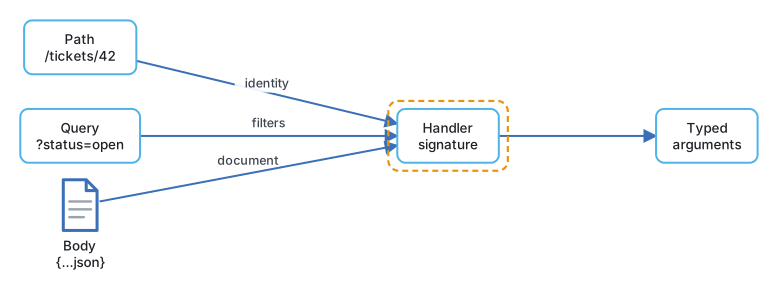
Each kind has a helper (Path, Query, Body) that adds constraints and documentation, used with Annotated so the type and the rules stay together, exactly as Field did in the Pydantic lessons.
Path and query
from typing import Annotated, Literal
from fastapi import FastAPI, Path, Query

app = FastAPI()

Status = Literal["open", "pending", "closed"]

@app.get("/tickets/{ticket_id}")
async def get_ticket(
    ticket_id: Annotated[int, Path(gt=0, description="Ticket number")],
) -> Ticket:
    ...

@app.get("/tickets")
async def list_tickets(
    status: Status | None = None,
    q: Annotated[str | None, Query(max_length=80)] = None,
    tag: Annotated[list[str], Query()] = [],
    limit: Annotated[int, Query(ge=1, le=100)] = 20,
    offset: Annotated[int, Query(ge=0)] = 0,
) -> list[Ticket]:
    ...
ticket_id is required because it is in the path; a request to /tickets/0 fails the gt=0 check with a 422. In list_tickets, every parameter has a default, so every one is optional. status is validated against the Literal, limit is clamped to a range, and tag accepts repeated keys (?tag=billing&tag=export) because it is declared as a list with Query(). Without the explicit Query(), a list[str] parameter would be interpreted as a body.
Query values arrive as strings, so this is lax Pydantic validation: ?limit=20 becomes the integer twenty, ?status=urgent returns a 422 naming the allowed values.
A query model
When a filter grows past four or five fields, group it. FastAPI accepts a Pydantic model for the query string, and the same model can be reused by another route.
from pydantic import BaseModel, Field

class TicketFilter(BaseModel):
    model_config = {"extra": "forbid"}
    status: Status | None = None
    priority: Literal["low", "normal", "high"] | None = None
    customer_id: int | None = None
    limit: int = Field(default=20, ge=1, le=100)
    offset: int = Field(default=0, ge=0)

@app.get("/tickets")
async def list_tickets(f: Annotated[TicketFilter, Query()]) -> list[Ticket]:
    return store.search(**f.model_dump(exclude_none=True))
Annotated[TicketFilter, Query()] is what tells FastAPI this model comes from the query string rather than the body. extra="forbid" turns an unknown query key into a 422 instead of ignoring it, which catches the ?stauts=open typo that would otherwise return every ticket.
Body
from fastapi import Body

class TicketIn(BaseModel):
    customer_id: int
    subject: str
    body: str

class Attachment(BaseModel):
    filename: str
    url: str

@app.post("/tickets", status_code=201)
async def create_ticket(ticket: TicketIn) -> Ticket:
    ...

@app.post("/tickets/{ticket_id}/attachments", status_code=201)
async def attach(
    ticket_id: Annotated[int, Path(gt=0)],
    attachment: Attachment,
    note: Annotated[str | None, Body(max_length=200)] = None,
) -> Ticket:
    ...
A single model parameter is the whole body. When a route has two body parameters, as attach does with attachment and note, FastAPI expects a JSON object with one key per parameter: {"attachment": {...}, "note": "..."}. To get that wrapping even with a single model, use Body(embed=True). The attach route also shows all three sources in one signature; nothing about that is special.
| Parameter | Declared as | Read from |
|---|---|---|
ticket_id |
Name appears in the path | Path |
status: Status | None = None |
Scalar with default | Query |
tag: Annotated[list[str], Query()] |
List with explicit Query() |
Query, repeated key |
f: Annotated[TicketFilter, Query()] |
Model with explicit Query() |
Query, one key per field |
ticket: TicketIn |
Pydantic model | JSON body |
note: Annotated[str, Body()] |
Scalar with explicit Body() |
JSON body, keyed by name |
Engineering note. Put identity in the path, filters in the query, and documents in the body, and do not bend the rule for convenience. A
POST /tickets/searchwith a body of filters looks harmless, but it cannot be bookmarked, cached, or linked from a log line, and someone will build a dashboard on top of it.
How FastAPI decides, in order
- If the name is in the path template, it is a path parameter. It is always required.
- If the annotation carries
Path,Query,Body,Header, orCookie, that wins. - If the type is a Pydantic model, it is a body parameter.
- Otherwise (
int,str,float,bool,Literal,datetime,UUID, and their optional forms) it is a query parameter.
Bools are parsed the lax Pydantic way, so ?urgent=true, ?urgent=1, and ?urgent=yes all mean True.
Where it goes wrong
- Route order.
@app.get("/tickets/{ticket_id}")declared before@app.get("/tickets/mine")captures the literal stringmineasticket_idand returns a 422. Declare fixed paths before parameterised ones. - A list without
Query().tags: list[str] = []in aGETis treated as a body, and the route quietly expects JSON on aGET. Always wrap query lists inAnnotated[..., Query()]. - A body on
GET. Many proxies and clients drop it. If a read needs a complex filter, use a query model. - The trailing slash.
/ticketsand/tickets/are different routes; FastAPI redirects between them with a 307, which browsers follow but some clients do not. Pick one convention and register it. - Too-clever coercion.
?customer_id=7.0is accepted for anintin lax mode. If exactness matters, validate with strict mode in the model.
Try it
Replace the in-memory list in main.py with a search function that applies TicketFilter, and expose it as GET /tickets. Then add PATCH /tickets/{ticket_id} that takes a TicketUpdate body with every field optional, uses model_dump(exclude_unset=True) from the serialisation lesson, and only changes what the client sent. Test through /docs: a filter typo should return 422, and a PATCH with {} should return the ticket unchanged.
With input covered, the next lesson turns to the other direction: response models, status codes, and what a route should say when it succeeds.
Continue with the complete track
Keep your progress and unlock the surrounding lessons, exercises, and complete learning path.
Unlock the complete track