PyTorch, compile, and model files
PyTorch, compile, and model files
When you download an open model, you get two things that matter: a small config.json that describes the architecture, and a set of *.safetensors shards that hold every weight as a named tensor. Nothing in those files runs. Code has to read the config, build the layers, pour the tensors into them, and then execute the math on a GPU. For almost every open model, that code is PyTorch.
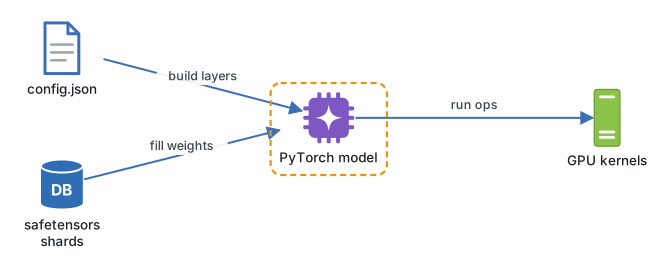
By default PyTorch runs in eager mode: Python walks through the model one operation at a time, and each operation launches its own CUDA kernel. That is easy to debug and slow in two ways. Python adds overhead between every launch, and each small operation writes its result back to GPU memory before the next one reads it. torch.compile fixes both by capturing the whole sequence as a graph, fusing operations and picking kernels tuned for the GPU in front of it.
Continue reading
Pro unlocks every video lesson, the full notes, worked sizing and cost calculations, and runnable configs across the Inference Engineering course, from GPUs and kernels to quantization, speculative decoding, disaggregation and production autoscaling.